Showing posts with label Padlet. Show all posts

Friday, July 18, 2014

WHY I KEEP TEACHING

Why I Keep Teaching


I am not an Edutainer, my job is not to entertain the students in order to get them to learn. 

My job is to make them think and learn the skills that will help them make this world a better place for my retirement. So when I can find anything that helps to capture their imaginations, then I am going to put it into play in my classroom.

In my Summer Health course we watched a documentary on SuperBugs.  We used Padlet for class feedback, each table used iPads to post their discussion points on the Padlet Wall to create further discussion. 

Here are a few images from the class.  

SMART Board Padlet Wall Begins

Students Use iPads to post to wall from group discussion.

 
Students respond to Padlet Wall
Padlet Wall Grows


Don't tell anyone the students had FUN!!!


Monday, July 7, 2014

Padlet - Include an Online Graffiti Wall for Your Classroom

Padlet - Include an Online Graffiti Wall for Your Flipped Classroom  


Padlet is a online web based "Graffiti Wall" for real time collaboration and a vehicle for the sharing of information, creating discussions and visualizing possibilities.


Uses for the Padlet

  • to brainstorm ideas 
  • to problem solve
  • to share understanding
  • to survey groups
  • to test student knowledge
  • to gather website links
  • to share information in a presentation
  • to organize data
  • to communicate online
  • to initiate discussions 
  • to create wish wall
  • to provide peer assessment
  • to expand your imagination
Padlet is very user friendly.  Once you have registered for your free account, which you can do through your Google account, it is very easy to create and name your wall.  

The layout menu located on the right side of the workspace allows for the options for your wallpaper, organization, privacy and notification settings.  

Padlet layoutLayout options include freeform as in the example above or in a streaming style.  


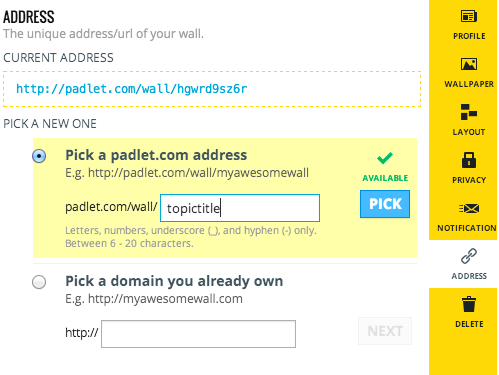
Sharing addressPadlet can assign a url for your wall or you can personalize the url for your needs. 


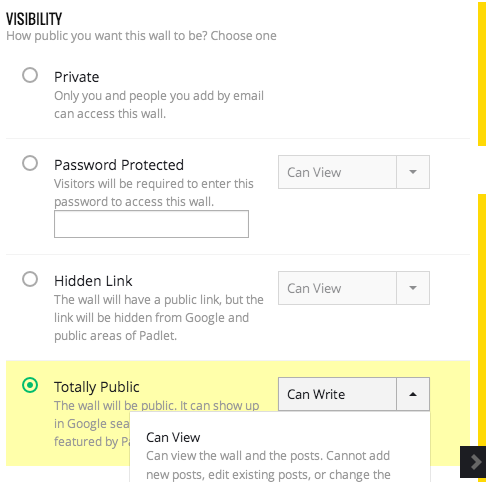
Padlet visibility options
There are options to share the Padlet wall in a variety of ways. You can make the wall public, or you can share with specified groups.  Users can view, view and share content, and view, share and edit content. 
The Padlet wall can be password protected. 


    Padlet sharing options
Padlet walls can be shared as a learning activity, saved PDF, uploaded to Dropbox, shared as a link, embedded in a webpage or shared through a QR code.


START YOUR OWN PADLET WALL TODAY!